Know what work actually happened.
Activity trackers tell you someone was active. Avadhi tells you what they were actually doing. It reads every screen, proves nothing was missed, and writes each hour up as evidence you can review, so oversight costs less and output goes up.
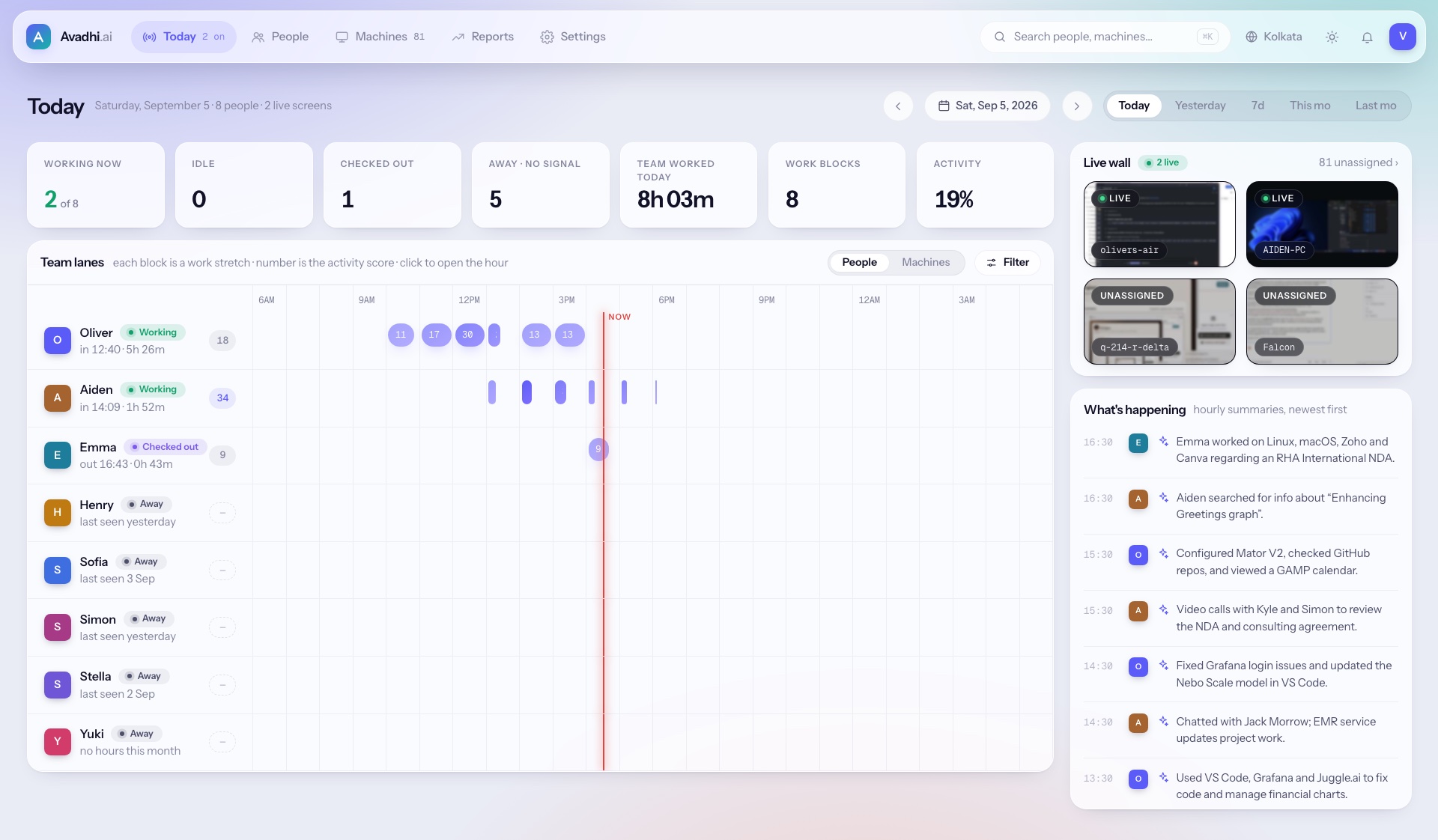
Today · one board for the whole team
Oversight today is expensive, partial and easy to beat
Whether it is done by team leads or by an activity tracker, most of the day goes unseen, and what is seen can be faked.
A jiggler and a video look “active”
Trackers count keyboard and mouse input, so a nudged mouse keeps someone green while a video plays. Reading and thinking show up as idle.
Screenshots nobody reads
Trackers capture screenshots, but a manager has to look at them. With hundreds of staff nobody does, so the evidence goes unseen.
Nothing proves coverage
A killed agent, a second monitor or a remote-desktop session leaves a blind spot no tool notices, and a supervisor can be persuaded to look away.
Why teams choose Avadhi over a tracker or another layer of supervisors
- –Count keys and clicks
- –Fooled by a jiggler plus a video
- –Screenshots left for managers to review
- –No proof every screen was seen
- –One lead watches 10–20 people
- –Sample a fraction of the day
- –Can be befriended or pressured
- –Every layer adds cost, not certainty
- ✓Understands what is on the screen
- ✓Input checks plus screen review catch the jiggler trick
- ✓Every hour written up, with replay and frames
- ✓Coverage and tamper checks on every screen
See your whole team's day on one board
Stop walking the floor or pinging people for updates. Status counters across the top, a lane per person below, and a live wall of every reporting screen. Hourly summaries land in the feed as the day goes on.
- ·Working, idle, checked out and no-signal at a glance
- ·Click any work block to land on that exact hour
- ·Each person's hours, activity, month and latest summary as cards
- ·Read the day in Kolkata, Cairo or Karachi time without doing the math
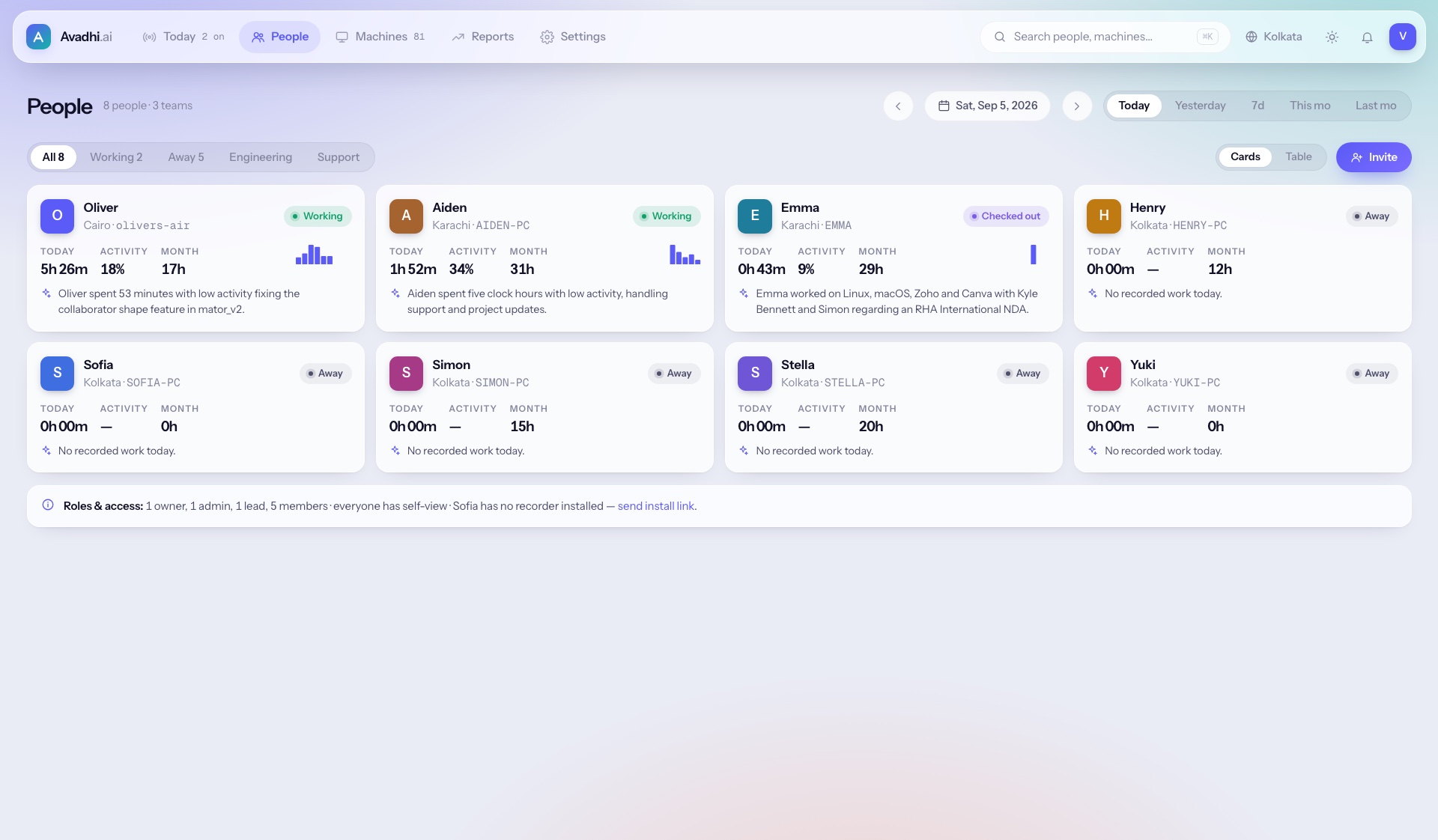
Settle any question about an hour in three clicks
Every hour becomes a plain-language narrative of what was done, the apps seen, an activity score, a ~60 second replay and every frame behind it. Go from a month of hours to one minute of screen without page hopping, so reviews and client disputes end with facts instead of opinions.
- ·Assumptions are labelled as assumptions, not evidence
- ·Frames open full size; replays scrub with speed control
- ·Proof of work you can share with offshore clients
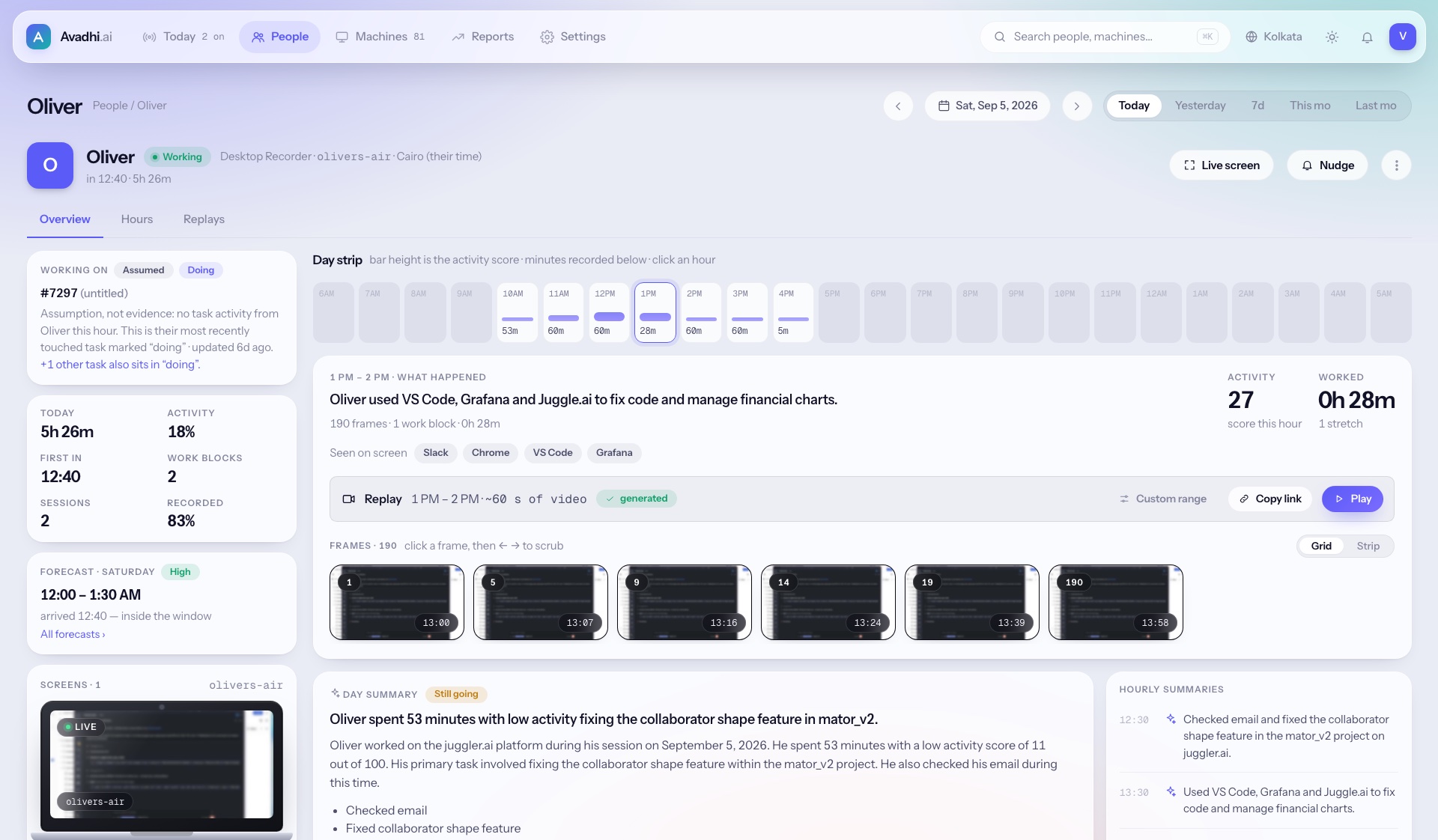
Proof that no screen went dark
Every machine reports its own health. Silent, locked, stale and unassigned screens surface on their own instead of becoming blind spots, and screens that send frames but count for nobody wait in a queue until you assign them in two clicks.
- ·Fleet grouped by health: reporting, stale, silent, offline
- ·Second monitors are covered too, not just the main display
- ·Agent versions and pending updates in one place
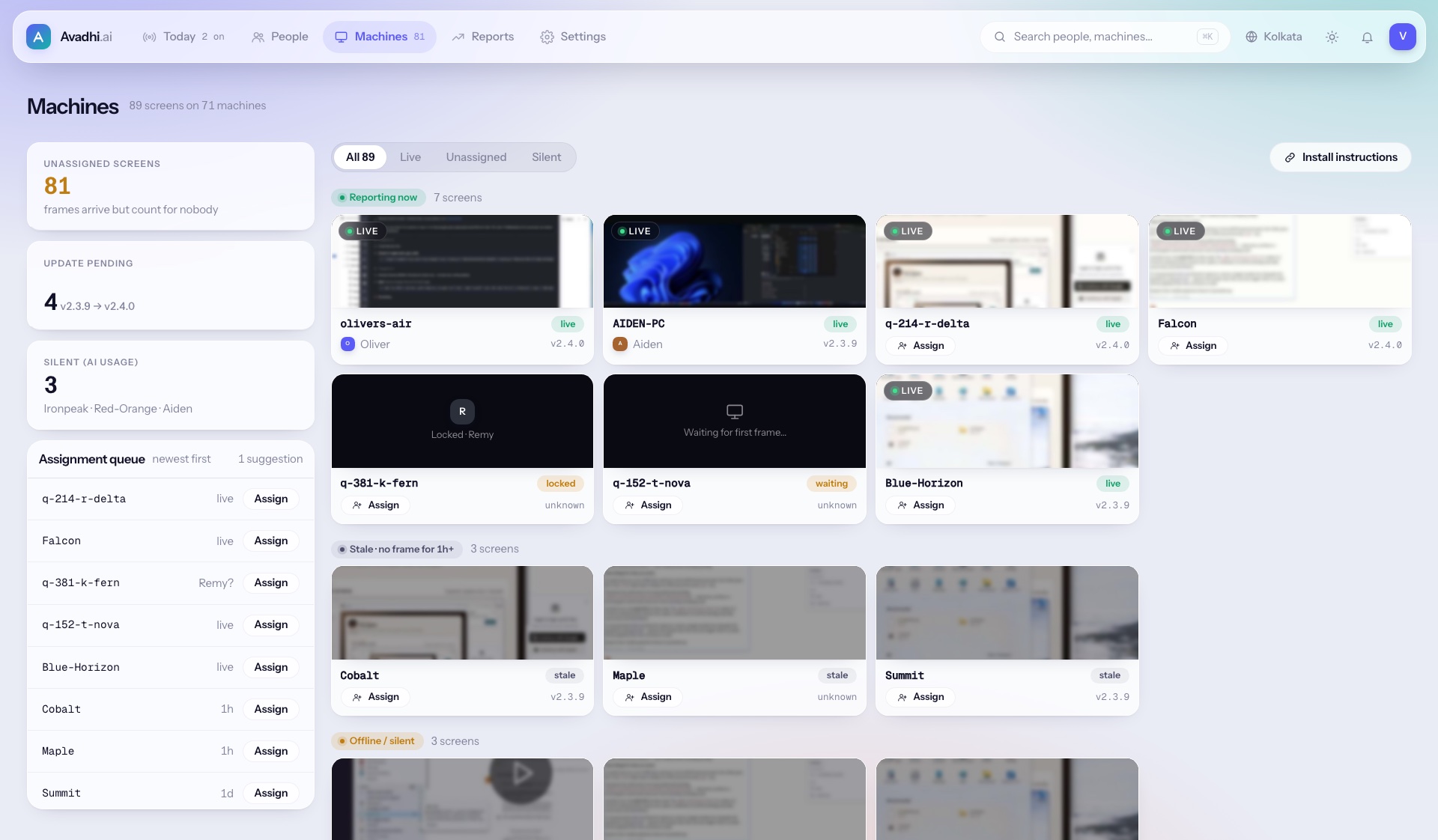
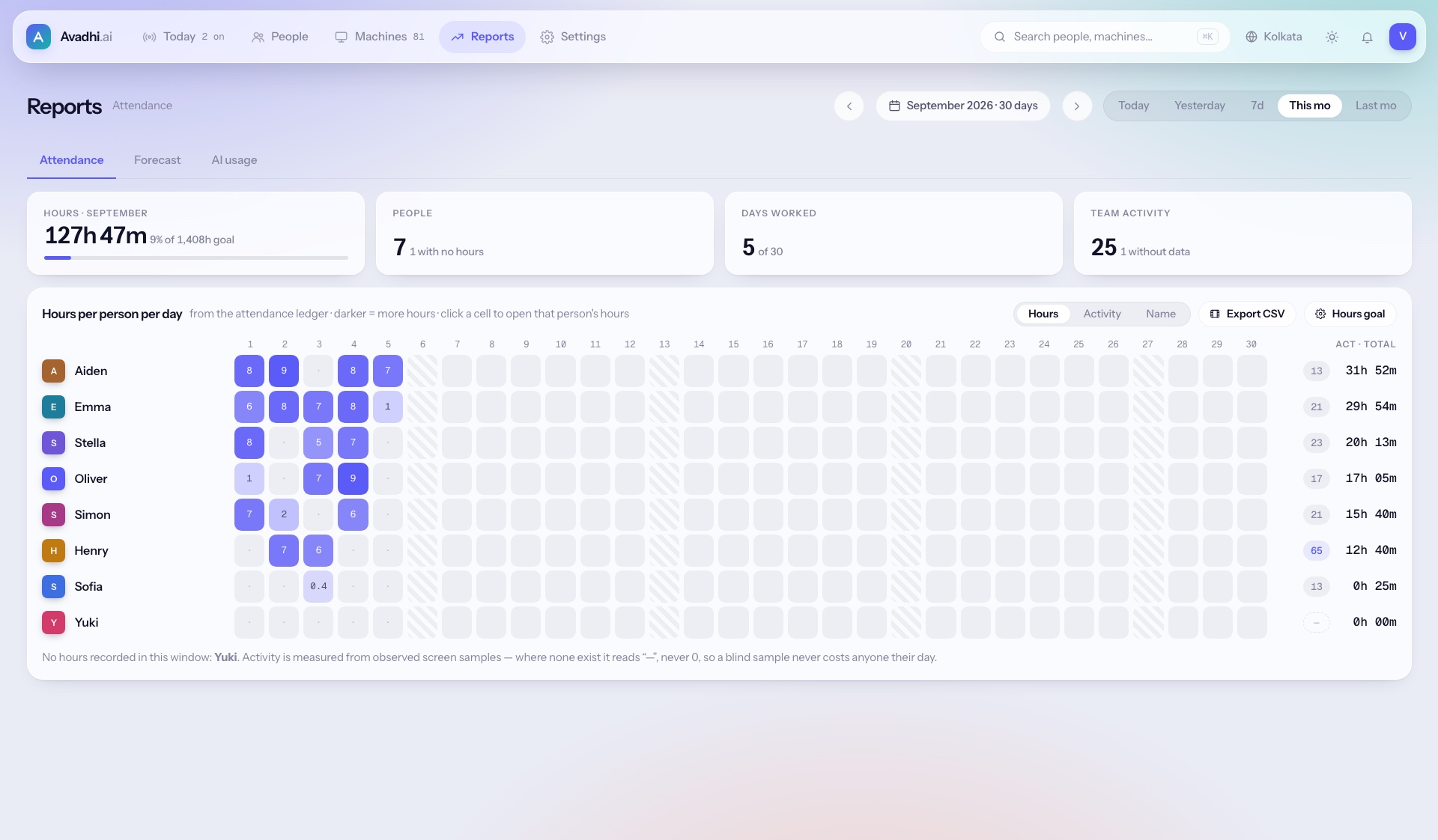
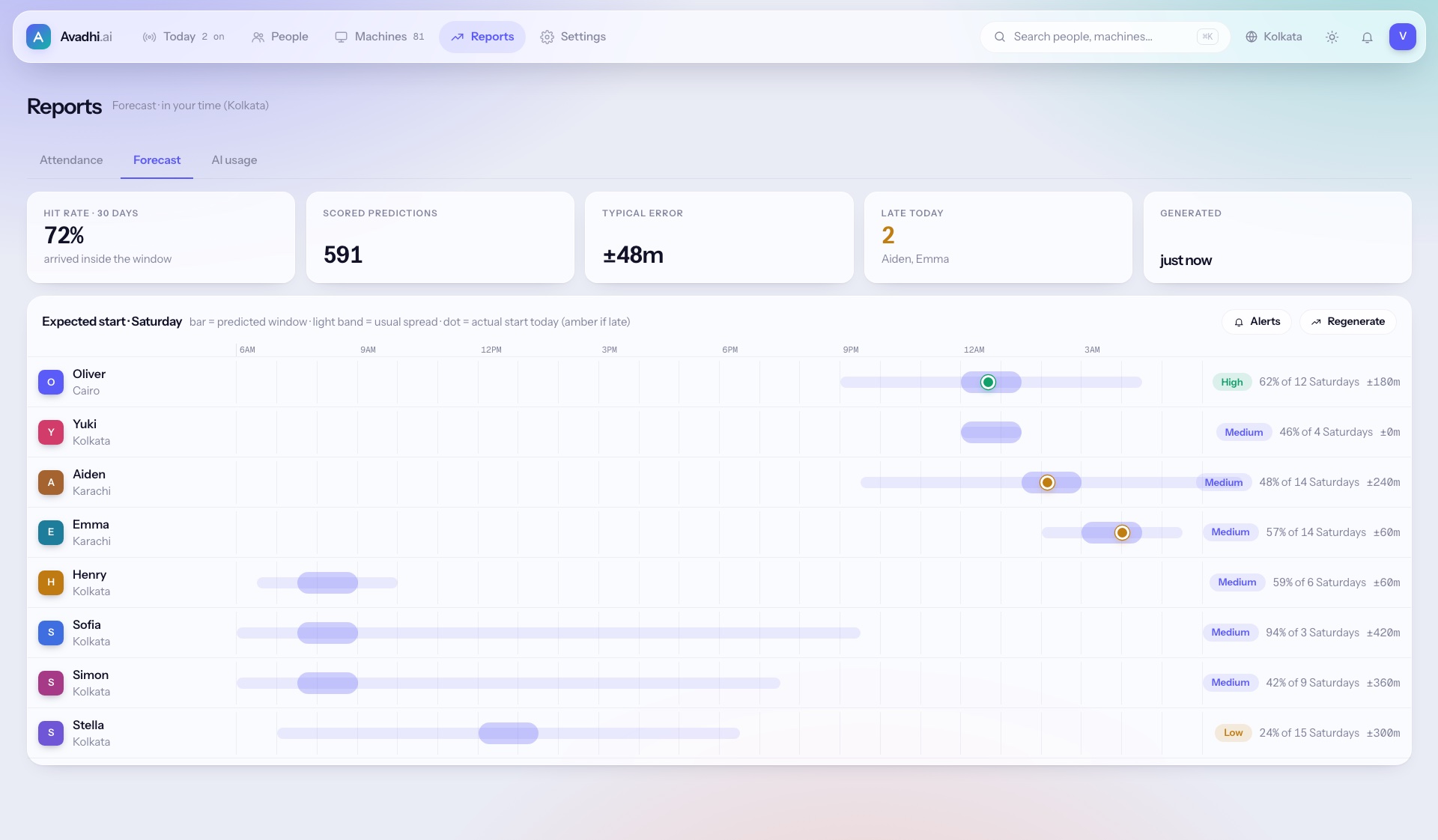
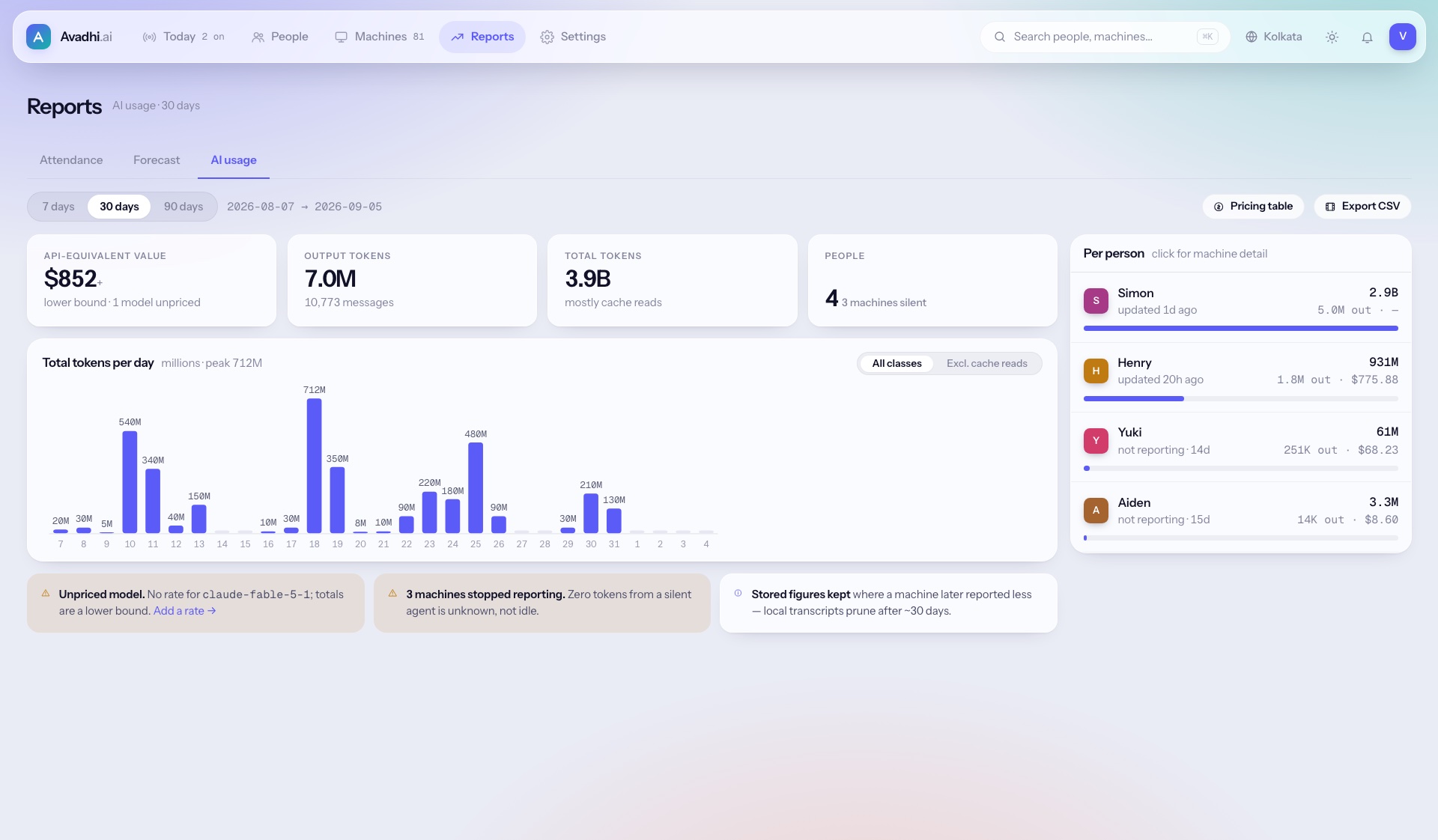
Reports that hold up in a review
Nothing in Avadhi is a dead end. Every cell, bar and row opens the hour it came from.
It pays for itself twice
You save on supervision, and consistent oversight lifts output. We measure both in your pilot.
Reviewers handle exceptions, not whole floors
AI covers every screen, so each human reviewer looks at flagged moments for hundreds of people. Example in India: moving from 1 team lead per 15 staff to 1 per 25 cuts supervision from about ₹4,000 to ₹2,400 per employee per month.
Visible, consistent oversight lifts output
When the easy cheats stop working, people procrastinate less. Field research found a 7.1% lift. We target up to 10% and report what we actually measure in your pilot, on your own output numbers.
Built for high-volume desk work
BPOs and contact centres
Cover work-from-home agents, end proxy attendance and give client audits the proof they ask for.
IT services and back offices
Settle billable-hour disputes and show offshore clients what their hours bought.
Banks, NBFCs and insurers
Keep customer data on screens under watch, with audit evidence and in-country data hosting.
Teams with offshore operations
See remote and offshore work clearly, with assurance a tracker cannot give and a parent company will trust.
Oversight people can see and challenge
Monitoring lifts output when it is transparent and fair, and hurts morale when it is not. So these are built in, not optional.
Visible, never covert
An on-screen indicator whenever capture runs, and nothing outside work hours.
Rules decide hours, not AI
Attendance comes from a simple rule. The AI never changes anyone's hours or pay.
People decide consequences
AI flags. A human reviewer decides, with the evidence in hand.
Employees see what we see
Their own frames, timeline and flags, and a one-click contest on any flag.
Counts, not keystrokes
We count input events. We never record what anyone types.
Short memory
Raw screenshots are deleted within 7–30 days. Only summaries are kept.
Your country, your data
Hosting in the region you choose, or on your own servers.
Prove it on your own team in 30 days
Every pilot ends with a one-page report you can check yourself. The pilot fee is credited against your first year if you continue.
Pick your output metric
Tickets closed, calls handled, claims processed: a number you already track, pulled from your system, not ours.
Install the recorder
A desktop agent on each machine. No timers to start or stop. It reports its own health, so you can see what is silent.
Run it side by side
For 30 days, Avadhi works alongside your current supervisors, ideally with a comparison team not yet on it.
Get the numbers
Output change, supervision time saved, issues caught by AI versus supervisors, and ROI. Reported as measured, even when the result is modest.
Questions buyers ask first
Is this surveillance? Won't staff hate it?
Monitoring is always visible, staff see their own data and can contest any flag, and no AI decides consequences. Research links exactly these design choices to better outcomes and less backlash.
How is this different from Hubstaff or other trackers?
Trackers measure keyboard and mouse input and leave screenshots for a manager to look at. Avadhi understands what is on the screen, writes each hour up for you, and proves every screen was covered. A mouse jiggler and a video will not pass.
What if the AI gets it wrong?
Sometimes it will. It only flags; a person decides with the evidence open. Its mistakes are visible and correctable, and every contested flag makes it more accurate.
Do you record keystrokes or anything personal?
No. We count input events but never record what anyone types. Capture pauses outside work hours, and raw screenshots are deleted within 7–30 days.
Where is our data stored?
In the region you choose, or on your own servers. Your data stays in your country.
Do you have SOC 2?
Not yet. We'll share our security architecture and complete your security questionnaire, and certification is on our roadmap.
How do we get started?
Click through the interactive demo, then book a 30-day pilot. We agree on an output metric up front and finish with a report you can verify.
Oversight that sees everything and misses nothing.
The demo is the real interface with sample data. Click anything in it, then see the same view of your own team in a 30-day pilot.